 كابلات شبكة إيثرنت Cat5e
 كابلات إيثرنت Cat6
 كابلات إيثرنت Cat6a
 كابلات Cat8
 كابلات إيثرنت بالجملة
 موصلات ومقابس
 إدارة الكابلات
 أدوات ومختبرات الشبكة
 OS2 أحادي الوضع بسيط
 أو إس 2 أحادي الوضع مزدوج
 أوم 3 ألياف متعددة الأوضاع
 OM4 متعدد الأوضاع
 OM2 متعدد الأوضاع
 OM5 متعدد الأوضاع
 كابلات MTP/MPO
 كابلات توصيل مخصصة
 مكونات الألياف الضوئية
 المواد والأدوات التنظيفية
 كابلات DisplayPort
 كابلات Mini DisplayPort
 كابلات HDMI
 كابلات HDMI مصغرة/ميكرو
 كابلات DVI
 كابلات VGA
 كابلات الصوت
 كابلات ثندربولت
 كابلات USB-C
 كابلات USB 3.0
 كابلات الطاقة
 كابلات SATA
 كابلات متسلسلة
لا توجد منتجات في سلة المشتريات.
ما هي كابلات ثاندربولت؟
Thunderbolt Cables: Comprehensive Technical Guide
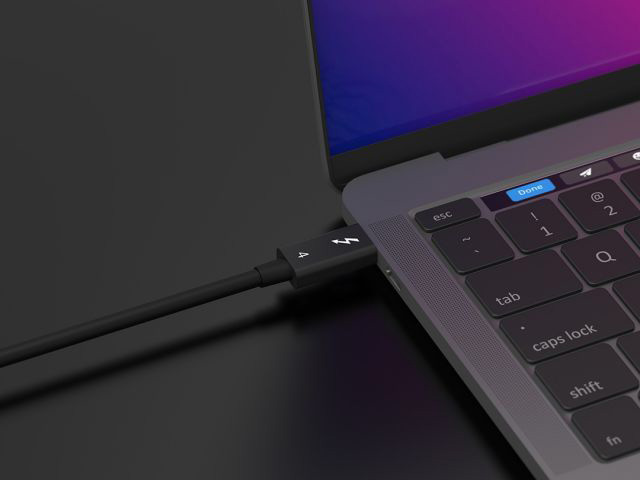
Thunderbolt is a high-speed interface standard co-developed by Intel and Apple. Thunderbolt Cables are transmission cables supporting this standard, core positioned as “all-in-one high-speed multi-functional cables”. Widely used in computers, external devices, professional workstations, and other scenarios, they are one of the core cable products for tech-savvy users in cross-border e-commerce.
I. Core Technical Specifications (Key Product Description Information)
1. Connector Form Factor
- Mainstream connector: USB-C (Thunderbolt 3/4 standards, backward compatible with USB-C);
- Legacy connector: Mini DisplayPort (Thunderbolt 1/2, gradually obsolete);
- Compatibility: USB-C-form Thunderbolt cables can be directly plugged into USB-C devices (transmission speed depends on the device’s supported standard).
2. Transmission Performance (Generation Comparison, Core Selling Points)
| Version | Bandwidth | Charging Power | Video Output | Data Transfer Speed | Maximum Transmission Distance (Active Cable) |
|---|---|---|---|---|---|
| Thunderbolt 1 | 10 Gbps | None | 1x 4K@30Hz or 2x 1080p | 1.25 GB/s | 3m (Passive) |
| Thunderbolt 2 | 20 Gbps | None | 1x 4K@60Hz or 2x 1080p | 2.5 GB/s | 3m (Passive) |
| Thunderbolt 3 | 40 Gbps | Up to 100W | 2x 4K@60Hz or 1x 8K@30Hz | 5 GB/s | 10m (Active) |
| Thunderbolt 4 | 40 Gbps | Up to 100W | 2x 4K@60Hz or 1x 8K@60Hz | 5 GB/s | 2m (Passive) / 100m (Fiber) |
| Thunderbolt 5 | 80 Gbps | Up to 240W | 1x 16K@60Hz or 2x 8K@60Hz | 10 GB/s | 10m (Active) / 100m (Fiber) |
- Key Notes:
- Passive cables: No built-in signal amplifier, cost-effective and portable, suitable for short distances (≤2m);
- Active cables: Built-in chip for signal amplification, supporting long-distance transmission (3-10m), ideal for professional scenarios (e.g., external monitors, storage arrays);
- Fiber Thunderbolt cables: Designed for ultra-long distances (up to 100m) with no signal attenuation, targeting enterprise/server room users.
3. Multi-Functional Integration (Core Differentiating Advantage)
- “One cable for everything”: Data transfer + video output + charging;
- Example: Connect a laptop to an external monitor with a single Thunderbolt 4 cable to simultaneously achieve “4K@60Hz video output + 5GB/s data transfer + 100W laptop charging”;
- Daisy-Chain expansion: Thunderbolt 3/4 supports daisy-chaining up to 6 devices (e.g., monitors, hard drive arrays, docks) without additional hubs.
II. Core Differences from Other Mainstream Cables (Key for Product Classification/Comparison)
| Cable Type | Core Advantages | Disadvantages | Target User Scenarios |
|---|---|---|---|
| Thunderbolt 4 | High speed (40Gbps), multi-functional integration | Higher price | Professional designers, gamers, business laptop users |
| USB 4.0 (USB-C) | Cost-effective (compatible with Thunderbolt 3) | Max bandwidth 40Gbps (20Gbps for some versions) | General users, office scenarios |
| DisplayPort 2.1 | Superior video output (8K@60Hz) | Video + audio only, no charging/data transfer | Users with pure display needs (e.g., gaming monitors) |
| USB 3.2 Gen2x2 | Stable data transfer (20Gbps) | No video output, low charging power (≤60W) | General data transfer (e.g., external hard drives) |
| HDMI 2.1 | Ultra HD video (8K@60Hz) | Audio/video only, no data/charging | TV/projector connections |
- Key Selling Point: The core competitiveness of Thunderbolt cables lies in “all-in-one solutions”, eliminating the need for users to carry separate data cables, video cables, and chargers—especially suitable for laptop and ultrabook users.
III. Product Classification & Target Users (Reference for Cross-Border E-Commerce Selection/Pricing)
1. Classification by Transmission Distance
- Short distance (0.5-2m): Passive cables, affordable, suitable for connecting laptops to docks/external hard drives;
- Medium distance (3-10m): Active cables, mid-range pricing , ideal for desktop offices (e.g., laptops to monitors) and small workstations;
- Long distance (10-100m): Fiber Thunderbolt cables, high-priced, targeting enterprises, server rooms, and professional studios (e.g., video editing, 3D design).
2. Classification by Power Rating
- Standard version (No charging/≤60W): Data + video only, suitable for desktops and devices without charging needs;
- High-power version (100W/240W): Supports PD fast charging (Thunderbolt 3/4/5), mainstream best-sellers for laptops and tablets.
3. Target User Profiles
- Individual users: Gamers (external high-refresh-rate monitors), designers (external 4K/8K monitors), business professionals (laptop-dock connections);
- Enterprise users: Studios (video editing, 3D modeling), IT server rooms (device interconnection), educational institutions (multimedia teaching equipment).
منتجات ذات صلة
-

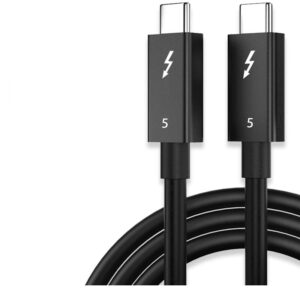
كابل ثันدربولت 5، 80 جيجابت في الثانية / حتى 120 جيجابت في الثانية، توصيل طاقة 240 واط، 8K 60 هرتز، كابل ثันدربولت معتمد – متوافق مع ثันدربولت 4 / USB4 / USB-C
نطاق السعر: من $20.99 خلال $22.99 هناك العديد من الأشكال المختلفة لهذا المنتج. يمكن اختيار الخيارات على صفحة المنتج